Showing posts with label Week 7. Show all posts

Friday, 1 November 2019

Prototype

This week I have started to begin designing my prototype game. Following my GDD, I have started creating the terrain. Using Adobe XD I have created a map that somewhat represents what I hope to create. However, I am not entirely sure it will come out the exact same as my wireframe.

(G) Represents Gems around World.

I have begun with building a forest. This was not mentioned in my GDD but due to complications in trying to make a lake I have replaced it with a forest. I have been struggling to create a lake in my game because of the height of the terrain. I googled and searched videos however I was unsuccessful in making it work. In my forest I have included a blood red grass and several gems in the colour #62CDC1. I have created two paths - one having many gems in the road and one path with only a single gem. The player must choose which path they want to go through.

Forest Area with Hidden Gems.

So far I have found creating the trees, grass and gems very easy! On the downside, the game takes a lot of time and patience to make as my laptop becomes slow once more and more content is added to the game. I have added a 'Ding' sound to my gems, using audio from Jimmy Vegas' videos. 

I am meeting my targets by following the tutorials supplied by Jimmy Vegas. They have been simple tutorials yet they include all things I want in my game. I have come across some difficulties however in this moment in time my game is coming along quite well. I have added a first person character to my game also. Following my wireframe of my game I believe it will come to be something very similar, if not the same. I am quite disappointed in not being able to create my lake but I have found things to replace it!

I am also currently working on a logo for the game as well as graphics for the main menu and game over screen. I have been unsuccessful in finding music I thought suit the game however once I finish my game I'll have a better feel for what I would like. I think in this current moment it is difficult to find music as I am not sure how the game will turn out, by choosing music in the end I can adjust it carefully to match the atmosphere of the game.

I hope to create the mountains and fences/stone walls by next week and maybe some more things if I am able. I am unsure about adding a house to my game as I am afraid it will consume too much time, but if I have time I would really like to add it to the gameplay. Once I am finished with designing my terrain to how I want it to look I will work on adding a countdown timer and gem counter to the game. So far I am content with how my game is coming along and I feel confident in my idea and progress so far.

Sunday, 27 October 2019

Unity Tutorial 06

Unity Logo. (Source)

In this weeks Unity Tutorial I learnt how to make a skybox, change lighting, create wind, weapons to pick up, fade screens, fixing bugs and adding a house to our world.

The skybox tutorial was very important in my opinion as I had been thinking of changing the skybox to fit a more eerie and dark theme to my game. The tutorial was easy to follow and gave me a chance to learn about adding skyboxes to my own game. In the tutorial we were shown how to use lighting. This is incredibly useful for me because I wanted to add darkness and a flashlight to my game, and now from this tutorial I am able to do so! Another thing I learnt from the tutorial was how to add wind. This may not be applicable to my game as I was thinking of creating it in a dark skybox however it was good to learn how to add such elements to games.

In the second tutorial we are shown how to make a collectable weapon rather than starting out with a weapon in hand. After much consideration, I have decided not to include enemies or weapons in my own game, meaning this tutorial was not very useful for me. I do think it's a great feature to have in a game, it makes a game more eventful as you are not supplied instantly with a weapon and have to go on a hunt to find one yourself! Secondly we learnt how to make a fade in screen. This is a nice touch to the game. Because I will be trying to create an opening screen to the game the fade in gives the game a nice element rather than starting the game abruptly. Despite the fact that this includes C#, it was not as difficult to create as I imagined and I am very exciting to add this element to my own game.

After making a fade out screen in the next tutorial we learnt how to make a fade out screen too. I'm glad to be learning how to create fade screens seeing as I will be needing them in my own game. In this moment in time I am not quite sure whether I would like to include a house in my own game. I believe it would add better gameplay to the game however I am not quite sure if I would have enough time to create it.

Games Decisions

Social game design operates within the physical and mental constraints of the human animal, so it pays to understand these constraints and build them into our designs. -Decision Making and Flow Theory.

  1. Friendships.
  2. Dunbar's Layers.
  3. Social Groups.
Friendship:

There are four key factors for friendship, these include: proximity, similarity, reciprocity and disclosure. If the factors listed are not met, the players are unlikely to become friends. As designers, we must build opportunities for consensual reciprocity that look like: opening, opportunity, response and acknowledgement. Common variations include escalation and rejection. At each stage, interactions take increasing time and effort, and involve richer communication. Almost every stage of these reciprocation loops involved consent. Each party must consent to both starting, continuing, and escalating the relationship.

Dunbar's Layers:

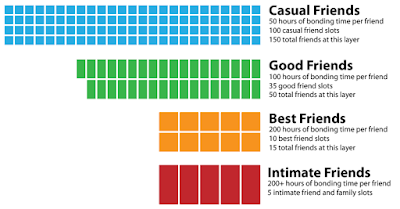
People organise their friendships by their one-to-one bonds. Social psychology has been studying these relationships for decades. Robin Dunbar said that humans can have up to 150 meaningful relationships. The smaller clusters of friends, known as Dunbar's layers, are organised into five categories. 
  • 1.5 people: intimate couple or the individual.
  • 5 people: intimate friends or family.
  • 15 people: best friends.
  • 50 people: good friends.
  • 150 people: acquaintances. 
An ideal way to visualise Dunbar's Layers is as a network of connections. There are different ways to use egocentric networks to analysis an individuals relationships, eg: dyads, triads, strong ties, weak ties and super-connectors. In order to develop a better relationship we much have high trust and take take time to build it. On average, a best friend would be formed from >200 hours of socialising. They would also meet up once a month. 

Social Groups:

A social group is a set of individuals labeled as being in a group. There are three dominant perspectives on what makes a group and these include: social identity perspective, self-categorisation perspective and social cohesion perspective. Common groups sizes roughly align with Dunbar's Layers, but are not identical concepts. In order to have a successful group you must have trust, stability, shared goals and roles.

Visualisation of Dunbar’s Layers. (Source)

When designing a game, don't build a big world first, because then you are faced with the key problem of your world being large and empty full of 500+ groups where strangers don't have trust. Rather focus on defining social activities, mapping out group sizes and trust levels, building an appropriate social support system and scaling the activity based off quality and quantity of friends available. 

Use Dunbar's Layers to determine the level of collaboration your audience will support. I, myself, am not making a multiplayer game but reading this article did help me learn more about multiplayer games and game decisions that should be considered.